![Modulr_Logo_Black_LightOrange-1.png]](https://knowledge.modulrfinance.com/hs-fs/hubfs/Modulr_Logo_Black_LightOrange-1.png?height=40&name=Modulr_Logo_Black_LightOrange-1.png)
Create, manage and issue Company Cards to your teams in a secure, controlled way. Set spending limits and a timeframe in which the card can be used.
Who can create?
-
Card Admins can create cards for themselves and other team members.
-
Non-Admin Cardholders cannot create new cards.
Don’t see Company Cards in the side menu? Your organisation may not have Company cards enabled or you don’t have permission. Contact us to have this enabled on your profile.
Creating a new card
-
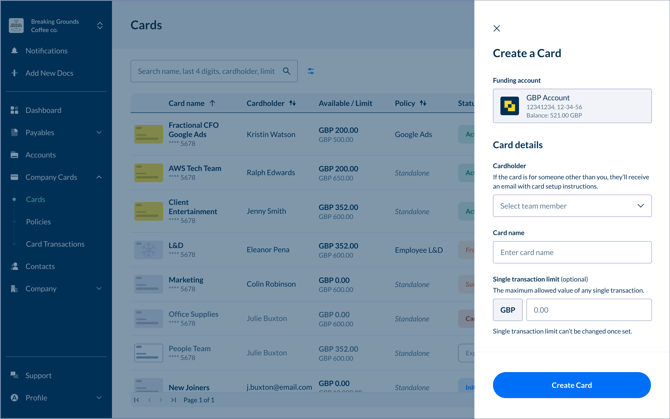
In the Modulr AP portal, go to Company cards → Cards in the side menu and select Create in the top right.
-
Complete the form shown:
-
Funding account: The account the card will draw funds from. Cards can only be created on GBP accounts.
-
Cardholder: Choose the existing team member who will use the card. You can choose yourself if you’re creating a card for your own use. You can also add a cardholder who is not yet a team member via email.
-
Card name: A nickname for the card; enter a short, recognisable name (e.g., Marketing Ads – UK).
- Single transaction limit – restrict individual purchases to not exceed this limit (must be less than or equal to the lifetime limit). Once set, this limit can't be changed).
-
Authorisation window (optional): Allow card payments only between specific dates. Once the activation window has started, this can’t be changed.
-
Activation date: Allow card payments only from this date.
-
Deactivation date: Allow card payments only until this date.
-
-
Cancellation date (optional): Set a date to cancel the card automatically before it’s natural expiry date (all cards have a 5 year expiry by default).
-
Spend Rules – choose a preset policy, or enter standalone spend rules
-
Choose a policy – Select an existing policy. The card will inherit the policy’s settings, or
-
Set your own rules – Enter custom lifetime limit not related to a policy: this is the total allowed spend over the card’s life.
-
-
-
Double-check the details are all correct and select Create.
The card is then created instantly and appears with a status of Initialised.
About card creation
Currently Customers can have a maximum of five cards active at a time.
Some notes about limits
Aside from the limits and controls that are set in a policy or when creating a card with standalone limits, there are some higher velocity limits that apply.
Maximum single transaction limit: GBP 10,000
Maximum lifetime limit: 10,000
Creating a card for someone else
When you create a card, you can select the Cardholder as yourself (if it’s for you!) or someone else.
Existing Modulr AP users/team members
Select an already existing Team Member from the ‘Cardholder’ list to be the cardholder.
As-yet non-activated users
Even if a new user has yet to activate their access in Modulr AP, you can still create a card for them – their email address will display in the Cardholder list.
