![Modulr_Logo_Black_LightOrange-1.png]](https://knowledge.modulrfinance.com/hs-fs/hubfs/Modulr_Logo_Black_LightOrange-1.png?height=40&name=Modulr_Logo_Black_LightOrange-1.png)
Search lets you find payments and batches across full payment lifecycle (approval to completion) in one place.
You can also approve, reject, cancel or run payee checks straight from your results, based on your permissions.
What you can search for
Single payments
| Parameter | Example |
|---|---|
| Payment ID | P2106A84C9 |
| External Reference | INV-2026-0042 |
| Account ID | A120HGT930 |
| Amount | 1500.00 |
| Scheduled Date | 2026-02-15 |
| Created Date | 2026-02-01 |
Batches
| Parameter | Example |
|---|---|
| Batch ID | B3209FFA21 |
| External Reference | PAYROLL-FEB-2026 |
Good to know before you start
- Enter the full values. Search matches exactly. Entering
INV-2026won't findINV-2026-0042. - 180-day window. Results go back up to 180 days. For older records, use Account Transactions or your reporting tools.
- One parameter per search
How to search for a payment
- Select Payments from the side menu
- Select Search
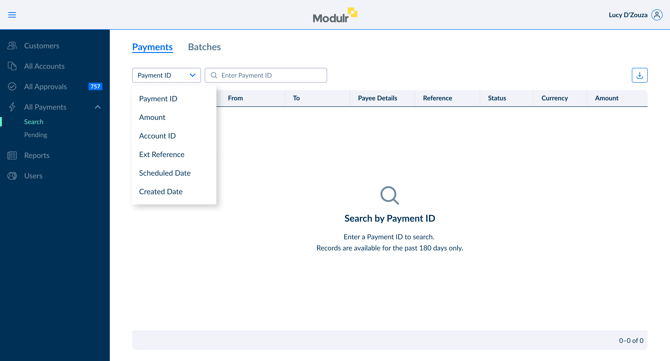
- Pick a parameter (e.g. Payment ID) from the dropdown.
- Type the full value and hit Search.
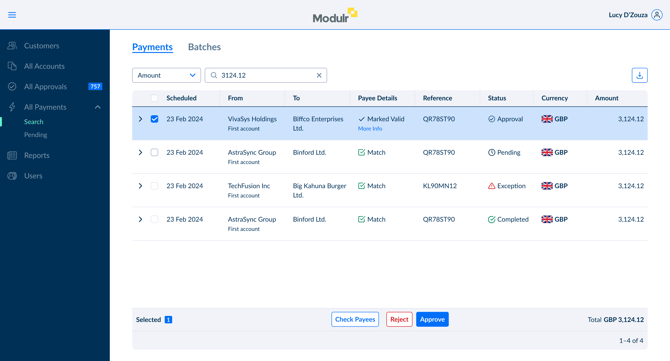
Results appear in a table showing each payment's details and status.
Payment statuses
| Status | Meaning |
|---|---|
| Approval | Awaiting approval |
| Pending | Approved and queued or future-dated |
| Exception | Hit an error during processing |
| Completed | Successfully executed |
All statuses show in one result set. You don’t need to switch screens.
Actions you can take
Depending on the payment's status and your role, you can act on it directly from your results:
| Action | When it's available |
|---|---|
| Approve | Approval status + approval permissions |
| Reject | Approval status + approval permissions |
| Cancel | Approval or Pending status + cancellation permissions |
| Payee Check | Approval or Pending status (GBP & EUR payments only) |
Why are there no Payee Checks on Exception or Completed payments?
The payee's verification status at execution time may have affected the outcome. A later check could give a misleading result.
Don't see an action button? The payment may have moved past that stage, or your role may not include that permission. If you're an admin, you can review and adjust role permissions in your account settings. Otherwise, ask your account administrator.
How to search for a batch
- Select Payment Search from the left-hand menu.
- Choose Batch ID or External Reference.
- Enter the full value and hit Search.

Batch statuses
Since a batch contains many payments at different stages, the status is a summary:
| Status | Meaning |
|---|---|
| Approval | All payments awaiting approval |
| Pending | Some payments are queued or future-dated; others may be completed |
| Exception | One or more payments hit errors; others may be completed |
| Cancelled | Batch cancelled — some payments may have completed first |
| Completed | All payments executed successfully |
Viewing batch details
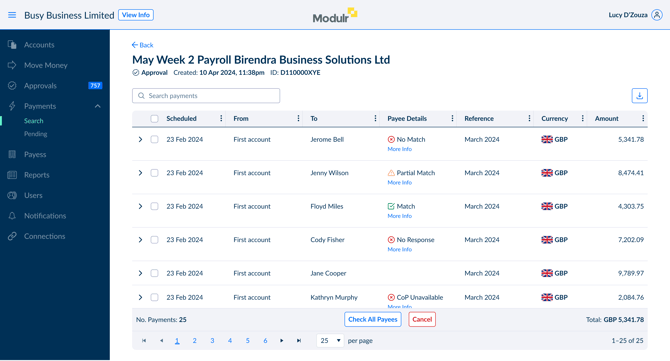
Click any batch to see every payment inside it, with individual statuses. You can take action on individual payments here too, based on your permissions.
Other screens you'll still use
Payment Search is for finding specific items by reference. It works alongside:
- Approvals: browse and manage payments awaiting approval
- Pending Payments: browse and manage future dated, failed, or cancelled payments and payments awaiting fund.
- Account Transactions: access records older than 180 days and reconciliation data.
FAQ
Can I use a partial reference?
Not yet. Enter the full, exact value. For now, partial matching is available the Approval screen only.
Why can't I find payments older than 180 days?
This is a limit of the Payments API. Use Account Transactions or reporting tools for older records.
My payment isn't showing up. What should I check?
Make sure you have the complete identifier, the payment is within the last 180 days, and (for External Reference) the reference was set when the payment was submitted.
I can see a payment but no action buttons. Why?
Either the payment's status doesn't allow that action, or your role doesn't have the right permission. Admins can check and update role permissions in account settings. Other users should contact their administrator.
Can I search across multiple accounts?
Yes. Payment ID, External Reference, and Amount searches return results across all accounts you can access. Account ID narrows results to one account.
Does this work for batch payroll runs?
Absolutely. Search by Batch ID or External Reference (e.g. PAYROLL-MAR-2026) to see the full run, its status, and every payment inside it.
