![Modulr_Logo_Black_LightOrange-1.png]](https://knowledge.modulrfinance.com/hs-fs/hubfs/Modulr_Logo_Black_LightOrange-1.png?height=40&name=Modulr_Logo_Black_LightOrange-1.png)
Who can view the user profile and notification settings?
The signed-in user can access the user profile screen for the Approvals part of the app.
How to find the user profile and settings
Tap the person icon in the top right of any screen to see the user profile details.
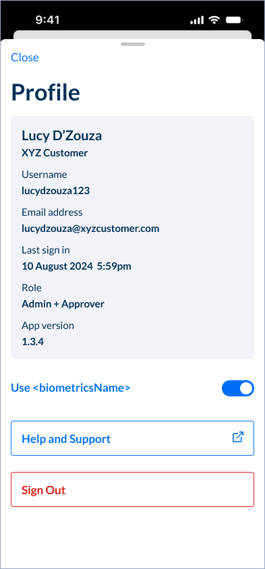
You'll also see options for:
- Turning on and off Face / Fingerprint ID
- Help and Support
- Sign out
Who can use push notifications?
Any user of the Modulr mobile app can set up push notifications.
How to find push notification settings
Make sure your device's push notifications are switched on for the Modulr app – you'll see a prompt when you first sign in to consent to receiving them. You may need to also check your device's settings to make sure the setting for the app is also switched on – these settings are usually found in your phone's settings app, under 'Notifications'.
About Modulr push notifications

When new payments or batches are available to approve, you'll receive a push notification to your device.
A 'badge' will be displayed on the app icon on your home screen, and a red dot indicator will also appear in the app on the Approvals tab, or on the relevant Customer indicating payments or batches are ready to approve.
NOTE: If a number of different payments or batches are being set up in a short period of time, we'll roll up the activity so you don't receive too many notifications at once.
