![Modulr_Logo_Black_LightOrange-1.png]](https://knowledge.modulrfinance.com/hs-fs/hubfs/Modulr_Logo_Black_LightOrange-1.png?height=40&name=Modulr_Logo_Black_LightOrange-1.png)
Adding a receipt creates a new Purchase Receipt in the system using our AI-powered data extraction for the details and line items. Admins can view them as Purchase Receipts to review and accept (or decline).
Who can upload receipts to card transactions?
-
All cardholders can upload receipt images to their own card transactions. Admins can upload receipt images to other Cardholders' transactions if necessary.
Uploading a receipt to a transaction
-
View a card’s transactions by navigating to Company cards in the side menu, then Cards, and select the card used for purchasing.
-
Use the search and filter controls to find the transaction you want to add a receipt to (if it’s not in the current view). It will show as 'Missing Receipt'.*
-
Select the transaction row or ‘Add Receipt’ from the 3-dot menu in the row.
-
Select the ‘Add Receipt’ button in the transactions details side drawer that opens (you’ll skip this step if you selected ‘Add Receipt’ directly from the transaction row).
-
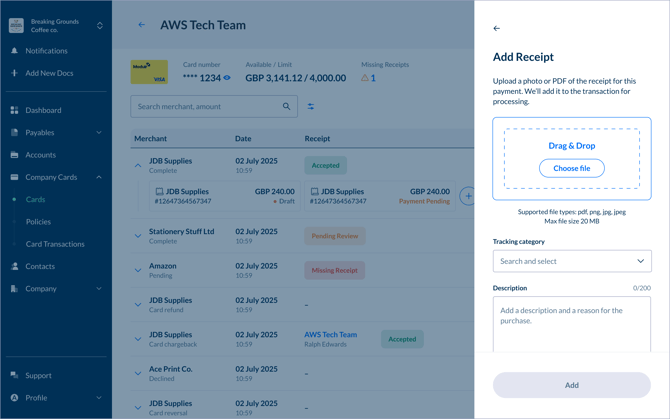
Drag and drop the receipt image, or select Choose File to choose the file from your computer.
-
Write a brief description of what you purchased and why, to help with reconciliation. You can also choose a tracking category if that is enabled in your settings.
-
The receipt will be uploaded and processed. In the background, we’ll create a new Receipt that Admins will be able to review. You’ll see the receipt added to the transaction details side drawer.
-
Close the side drawer. The status of the transaction will have changed to 'Pending Review'.
*Transactions with a status of 'Pending Review' can also have additional receipts added to them
Receipt tips
-
Make sure receipt images are clear and in focus
-
Photos of receipts captured on your phone are fine, even if they’re a little crumpled, but try to flatten the receipt as much as possible before taking a photo – this will result in more accurate data extraction.
-
Other receipt documentation such as PDFs attached to purchase confirmation emails will also work as long as they contain all the receipt information required.
