![Modulr_Logo_Black_LightOrange-1.png]](https://knowledge.modulrfinance.com/hs-fs/hubfs/Modulr_Logo_Black_LightOrange-1.png?height=40&name=Modulr_Logo_Black_LightOrange-1.png)
Who can use virtual company cards for payments?
Any employee of the company who has been issued with a company card can use it for payments. Users should only use their own cards with their name on.
Finding a virtual company card's details
-
From the side menu, select Company Cards, then Cards.
-
Choose a card from the list.
-
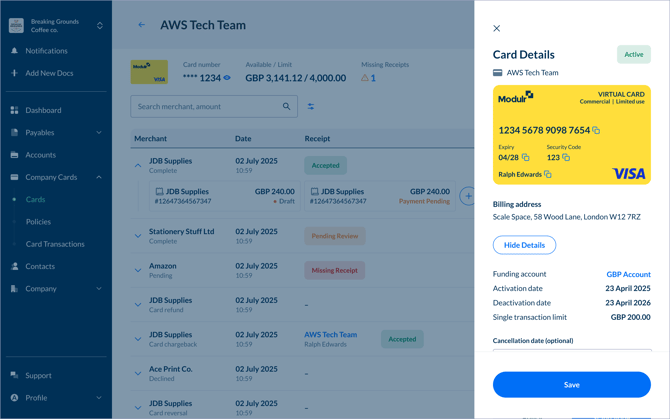
On the card detail page, select Card Options to open the details drawer
-
Select 'Show Details' (you'll be asked to authenticate) then the card number, expiry, security code and billing address are revealed.
-
The details can be copied by selecting the copy icon next to each number.
Using a virtual company card to make a payment
Enter the copied card details into the web form on the merchant's site where you are making a purchase as you would normally when using a card to pay.
3DS security challenge during a purchase
Some online merchants websites may present a pop up window requesting further security details relating to the card when being used for a payment – these will be the questions/answers that were set up by the user when they activated the card. These details should never be shared.
Where can virtual company cards be used?
Virtual company cards can be used anywhere Visa payment cards are accepted – online or over the phone where you would quote the card details.
Suspicious transactions
If it's possible a card's details may have been compromised, freeze the card immediately; this will prevent any further transactions on the card – cardholders can freeze their own cards as well as admins. Admins can also cancel cards.
It's a good idea to first check with the merchant regarding a suspicious transaction to understand their policies on refunds and card fraud.
If you feel a card has been used for a fraudulent transaction, contact Modulr Support who will help navigate the chargeback process.
Chargebacks
A chargeback allows a cardholder to dispute a transaction they believe is unauthorised, incorrect, or where goods or services were not received as expected.
Contact Modulr Support to enquire about the chargeback process. We'll assist in submitting the dispute via Visa.
Card security tips
-
Refrain from storing your card information on websites you rarely visit or use.
- Don't share the security questions and answers set up when a card was activated.
-
Issue additional cards for individual users who need to make payments to the same supplier – avoid sharing cards.
-
Regularly check the transaction history for any suspicious or unauthorised payments.
- Never disclose your card details to anyone including the Modulr Support Team.
